Incheon Airport Smart Pass vs Security Queues:
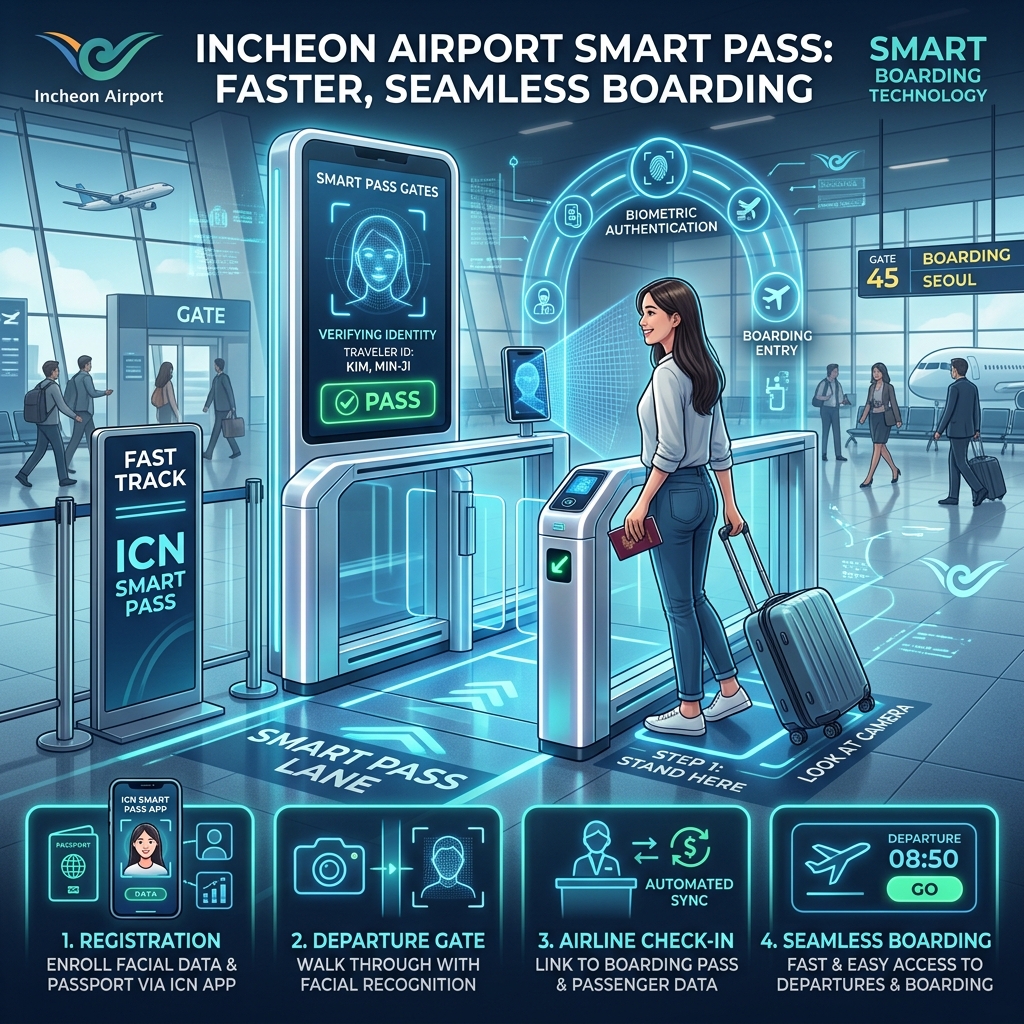
Departing from Incheon International Airport during peak morning or late-afternoon windows frequently introduces immense anxiety. As thousands of travelers saturate the terminal hulls simultaneously, standard passport control and carry-on security lines develop massive, slow-moving bottlenecks. Waiting in these dense check-in crowds can drain your departure day energy and risk missed flight windows.
To bypass this final transit friction layer, the airport expanded its facial recognition infrastructure, known as the Smart Pass system. Registering your identity profile beforehand is 100% free of charge (0 KRW, approx. $0.00 USD) and allows you to skip the passport-pulling gauntlet completely.
The 2026 Expansion: Identifying the Smart Pass Lanes
The Ministry of Land, Infrastructure, and Transport executed a major hardware rollout, expanding the active count of dedicated facial recognition lanes across the main terminals. Smart Pass lanes now account for nearly a third of all active departure hall entrances, significantly reducing processing latency and saving you up to 30 to 45 minutes of standing in line during peak hours.
[Standard Queue: Passport/Paper Ticket Check (Slow)] vs. [Smart Pass Lane: Facial Scan (Instant)]
To take advantage of this high-speed bypass lane, you must position yourself at the correct terminal gates:
Terminal 1 (T1) Coordinates: Head directly to Gate 2 or Gate 5 along the main departure floor.
Terminal 2 (T2) Coordinates: Target the dedicated entry barriers at Gate 1D, Gate 2C, or Gate 2D.
Step-by-Step Digital Registration Protocol
The biggest mistake travelers make is assuming they can activate the biometric link at the physical departure gate frame. The hardware cannot build profile metrics on the fly. You must build your identity layout inside the official application at least one day prior to departure.
Application Installation: Download the official "ICN Smart Pass" application onto your smartphone device.
Passport OCR Scanning: Open the registration module and align your physical passport page inside the camera overlay frame. The software reads the embedded security chip data automatically.
Biometric Face Capture: Position your face inside the digital circle guide. Blink your eyes clearly under direct lighting conditions to lock your unique geometric facial mapping into the secure airport network registry.
Boarding Pass Link: Once you complete your mobile airline check-in 24 hours before takeoff, scan the digital QR code of your electronic boarding pass into the app to bind your identity to your active flight number.
Navigating the Security Threshold
When you arrive at your designated gate coordinate (such as Gate 5 in T1), pass straight past the long, winding lines of standard ticket holders. Walk directly up to the automated Smart Pass barrier gate.
Look straight into the high-definition camera lens mounted on the frame. The glass barriers will slide open within two seconds based on facial recognition matching alone, allowing you to bypass the initial security queue layer without ever taking your physical passport or paper boarding slip out of your pocket.
Ensure you maintain your travel documentation secure inside your carry-on jacket pocket, as standard manual checks are still enforced during the final physical bag screening lines. For travelers looking to secure their express airport rail connections or finalize transit vouchers before hitting the terminal halls, Source data streams provide immediate mobile delivery channels.
While you skip airport gate queues using your Smart Pass facial scan, make sure you don't get stranded without data by missing terminal counter schedules. Read our Incheon Airport SIM Card Pickup Coordinates & Operating Hour Traps Guide to secure your connectivity.
📍 Data sourced from TMAP Mobility congestion logs & Seoul Metropolitan Government planning registers.
🎫 Book AREX & Transit Passes via Klook → Get Discounted Transit Passes (Klook)
🏨 Secure Verified Hotels via Agoda → Browse Verified Stays (Agoda)
⚡ Full affiliate links & booking codes: ↓ See Comment Section below
Essential travel gear recommended for optimal safety and comfort during your journeys. Essential travel gear recommended for optimal safety and comfort during your journeys. Essential travel gear recommended for optimal safety and comfort during your journeys. Essential travel gear recommended for optimal safety and comfort during your journeys.Travel Essentials
Verified Gear
VINTAR 35.5W International Power Adapter
★ 5.0
6 Pack US to Europe Plug Adapter - Type C (White)
★ 4.9
BESTEK 220v to 110v Converter with USB C 35w
★ 4.8
HANYCONY Type E F Plug Adapter
★ 4.8