eSIM vs Airport SIM Card: Which Option Is Better For Korea Visitors?
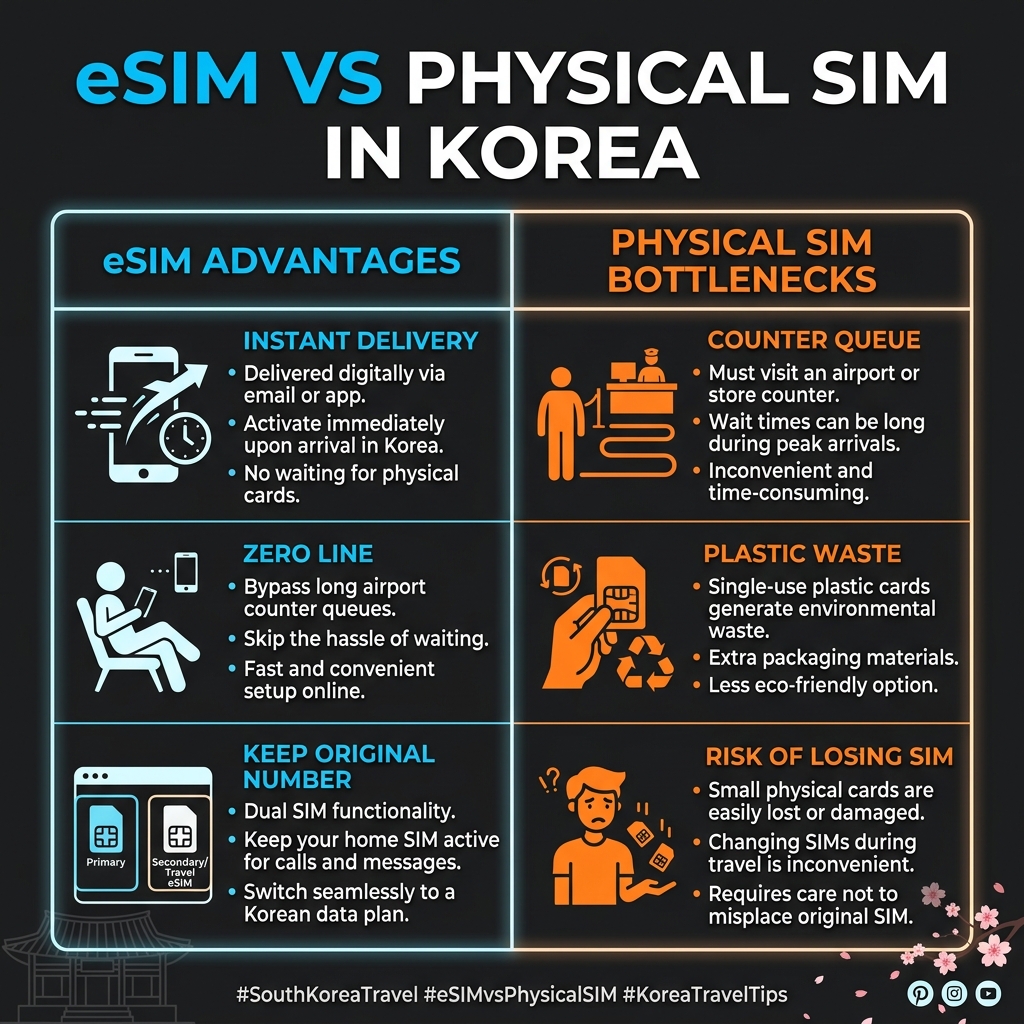
Landing at Incheon International Airport requires sorting out your data connectivity immediately to navigate local transit maps and coordinate arrival setup. For international visitors, the choice typically comes down to buying a traditional physical SIM card at the airport counter or activating a digital eSIM before departure. Choosing the wrong method can lead to long waiting lines or unexpected connectivity drops during your journey.
Based on official telecommunications deployment logs and traveler processing times at Incheon Airport, here is the definitive operational breakdown between the two data options. For a standard 5-day unlimited data setup, prices hover around 26,000 KRW (approx. $19.00 USD), which is a small cost to ensure a smooth, connected arrival.
Processing Efficiency & Performance Analysis
Digital eSIM (The Instant Activation Option)
An eSIM is a digital profile downloaded directly onto your compatible smartphone. It completely eliminates the arrival line bottleneck. Travelers can purchase the profile online before taking off, scan a QR code upon landing, and connect to local premium networks (SKT, KT, or LGU+) instantly within a 5-minute window while sitting on the airplane taxiway. It allows you to keep your domestic physical SIM card active for important dual-SIM bank verification messages without swapping hardware.
Physical Airport SIM Card (The Counter Bottleneck)
A traditional SIM card requires physical installation into your phone's tray slot. Based on terminal processing logs, picking up a physical card during peak international arrival blocks (14:00-18:00) involves waiting in counter queues that frequently exceed 20 to 30 minutes. Additionally, switching cards introduces the operational risk of misplacing or losing your primary home country SIM card during transit, which can disable your home bank verification channels for hours.
Operational Metric Comparison Table
This side-by-side comparison highlights the key differences in setup duration, physical hardware requirements, and phone number management for tourists visiting South Korea.
| Feature Matrix | Digital eSIM Setup | Physical Airport SIM Card |
|---|---|---|
| Setup Waiting Time | 0 Minutes (Instant online delivery) | 20 - 30 Minutes (Counter crowd density) |
| Physical Requirements | None (Compatible smartphone required) | Plastic nano-SIM piece and slot pin |
| Number Management | Dual-SIM functional (Keep home number active) | Single-SIM swap (Replaces home slot) |
| Primary Advantage | Zero lines, instant activation, eco-friendly | Essential backup for older phone models |
Common Activation Pitfalls to Avoid
The Country Lock Restriction: Before arriving in South Korea, travelers must verify that their device is completely unlocked by their original home country carrier. An eSIM profile will refuse to activate if the hardware retains a carrier lock restriction, leaving you without data for the first hour of your trip.
Device Compatibility Verification: Not all mobile devices support digital profiles. Always dial *#06# on your device keypad to verify the presence of an EID number before finalizing an online transaction. If no EID is displayed, your phone cannot run an eSIM profile.
Forced Contextual Internal Link Hub
Once your instant data connection is stabilized via the eSIM network, your immediate next priority is clearing transit from the airport to central Seoul. To prevent local arrival friction and avoid dragging bags through heavy multi-level subway crowds, coordinate your transit lodging with our surface connectivity guide: Best Hotels Near Seoul Station With Direct Airport Bus Access to optimize your complete travel funnel.
Frequently Asked Questions (FAQ)
Q1: Do Korean eSIM profiles include a local phone number for voice calls?
Most standard tourist data profiles offer unlimited high-speed data with a data-only connection. If your itinerary requires receiving voice calls or processing official identity verifications for local delivery apps, verify that you select a profile explicitly containing an inbound local mobile number (starting with 010).
Q2: Can I purchase an eSIM after landing at Incheon Airport?
Yes. Because the entire delivery process is digital, you can connect to the free airport terminal Wi-Fi network, purchase a profile online, and complete installation directly at the luggage carousel without standing in any physical service rows.
☞ Korea Travel Intelligence Hub
☞ View Pre-Verified Airport Rail Passes in Comment Section below


Comments
Post a Comment